%20--%3e%3clinearGradient%20id='bg'%20x1='0%25'%20y1='0%25'%20x2='100%25'%20y2='100%25'%3e%3cstop%20offset='0%25'%20stop-color='%230078d4'/%3e%3cstop%20offset='100%25'%20stop-color='%2300a6a6'/%3e%3c/linearGradient%3e%3c!--%20Subtle%20shadow%20for%20front%20file%20--%3e%3cfilter%20id='file-shadow'%20x='-15%25'%20y='-15%25'%20width='135%25'%20height='135%25'%3e%3cfeDropShadow%20dx='1'%20dy='2'%20stdDeviation='2.5'%20flood-color='%2300000040'/%3e%3c/filter%3e%3c/defs%3e%3c!--%20──%20Background%20─────────────────────────────────────────────────────────%20--%3e%3crect%20width='64'%20height='64'%20rx='14'%20fill='url(%23bg)'/%3e%3c!--%20──%20Back%20file%20(the%20'duplicate'%20—%20semi-transparent,%20offset%20up-right)%20───%20--%3e%3cpath%20d='M21,8%20L39,8%20L46,15%20L46,45%20L21,45%20Z'%20fill='rgba(255,255,255,0.30)'/%3e%3c!--%20dog-ear%20fold%20--%3e%3cpath%20d='M39,8%20L46,15%20L39,15%20Z'%20fill='rgba(255,255,255,0.15)'/%3e%3c!--%20──%20Front%20file%20(original%20—%20solid%20white)%20────────────────────────────────%20--%3e%3cpath%20d='M11,14%20L29,14%20L36,21%20L36,51%20L11,51%20Z'%20fill='white'%20filter='url(%23file-shadow)'/%3e%3c!--%20dog-ear%20fold%20(light%20blue%20tint%20=%20shadow)%20--%3e%3cpath%20d='M29,14%20L36,14%20L36,21%20Z'%20fill='%23bfdbfe'/%3e%3c!--%20File%20content%20lines%20--%3e%3crect%20x='16'%20y='28'%20width='15'%20height='2.5'%20rx='1.2'%20fill='%2393c5fd'/%3e%3crect%20x='16'%20y='34'%20width='15'%20height='2.5'%20rx='1.2'%20fill='%2393c5fd'/%3e%3crect%20x='16'%20y='40'%20width='10'%20height='2.5'%20rx='1.2'%20fill='%2393c5fd'/%3e%3c!--%20──%20Elimination%20badge:%20red%20circle%20+%20bold%20X%20─────────────────────────────%20--%3e%3ccircle%20cx='47'%20cy='47'%20r='13'%20fill='%23dc2626'/%3e%3c!--%20X%20mark%20(slightly%20thicker%20for%20small-size%20readability)%20--%3e%3cline%20x1='42'%20y1='42'%20x2='52'%20y2='52'%20stroke='white'%20stroke-width='3.5'%20stroke-linecap='round'/%3e%3cline%20x1='52'%20y1='42'%20x2='42'%20y2='52'%20stroke='white'%20stroke-width='3.5'%20stroke-linecap='round'/%3e%3c/svg%3e) dupExWinFind and remove duplicate files on Windows — safely, and fast.
dupExWinFind and remove duplicate files on Windows — safely, and fast.
In development
dupExWin is DupEx for Windows: the same safe, high-performance duplicate finder, rebuilt as a native Windows app. It finds byte-identical files and makes it easy to choose which ones to remove — fast, and without putting data at risk. It does one thing, and does it perfectly.
Built for the one use case where getting it wrong is not an option.
At a glance
- Full control — nothing is deleted or moved to the recycle bin without confirmation
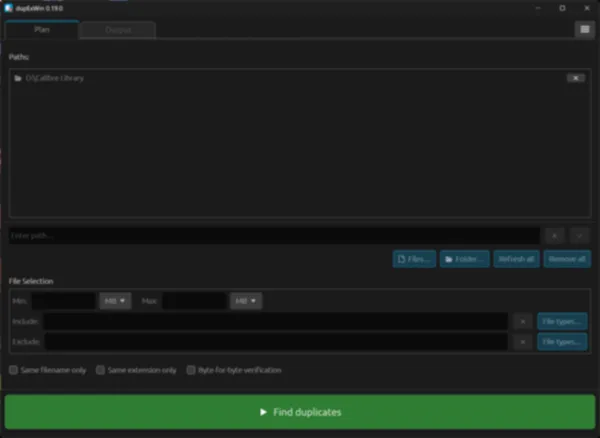
- Rules do the tedious part — duplicates can be picked by age, path, name or regular expression, for deletion or for protection, whole folders included
- Optional byte-for-byte verification — confirms every duplicate by direct comparison, not by hash alone
- Adapts to the storage — SSDs, hard disks, removable drives and network shares are detected up front, and the scan strategy is tuned to each
- Repeat scans are much faster thanks to a hash cache
- Filters that narrow the scan down — size range, file types, include/exclude patterns, same name or same extension only
- Built for large collections — search, sort and clean up hundreds of thousands of files
- Explorer integration — "Find duplicates with dupExWin" for folders and files, right from the context menu
- Keyboard shortcuts for frequent actions — moving through the list, selecting, protecting, opening and deleting
- Setup for the current user — no administrator rights needed
- No ads, no spyware, no tracking
- One-time purchase, no subscription
- Available in 23 languages
- Native Windows app
Highlights
Safety by architecture
dupExWin never deletes without confirmation. Reference folders are automatically protected, and before deleting, a confirmation names the number and size of the files — with a second warning if no copy of a file would remain. When moving to the recycle bin, files on drives without one, such as network shares, are left untouched and reported.
Optional byte-for-byte verification
By default a full-file BLAKE3 hash identifies duplicates. Turn on byte-for-byte verification and every match is confirmed bit by bit — so a hash collision can never cause a wrong deletion, not even in theory.
Fast funnel algorithm
The same staged funnel as DupEx for Linux — group by size, sample hash, pairwise sampling, full hash — so the expensive reads only ever touch a handful of candidates. Hashing uses the SIMD units of the processor, across all CPU cores.
Group & reference system
Compare a backup against the original without reporting the duplicates inside the backup itself. Hardly any other duplicate tool does this.
Automatic tuning
dupExWin asks Windows what each path lives on — SSD, hard disk, removable drive or network share — and adjusts the number of parallel reads and the reading strategy to it. No manual tuning needed.
Real-time results
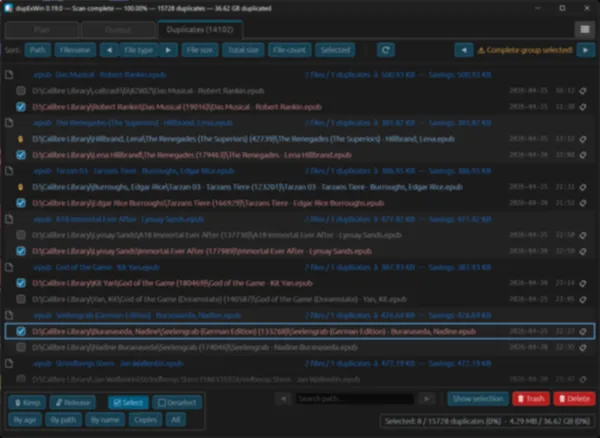
Duplicate groups appear while the scan is still running, and stay smooth to scroll with hundreds of thousands of entries. They can be reviewed, selected and even partly deleted before the scan finishes.
Rule-based selection
Select oldest, keep the shortest path, filter by regex — dupExWin selects thousands of duplicates in seconds by those rules, ready to be moved to the recycle bin or deleted permanently.
Right from Explorer
Right-click one or more folders or files in Windows Explorer and choose "Find duplicates with dupExWin". The setup offers the entry, and it can be switched on or off in the settings at any time. On Windows 11 it sits under "Show more options".
Built for power users
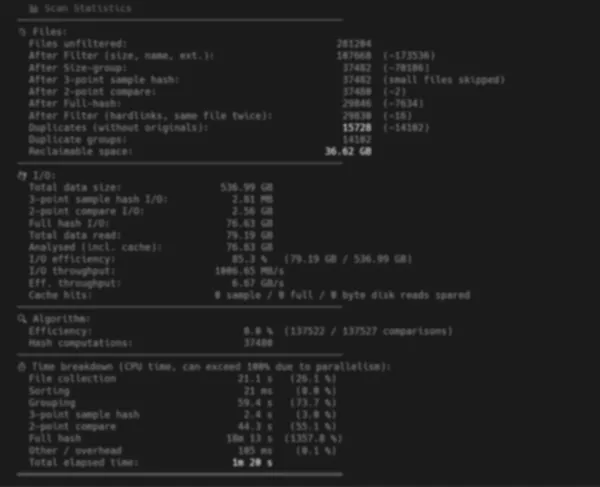
A logfile for every run, detailed statistics after every completed scan, the number of scan threads, control over the hash cache and keyboard shortcuts.
What is different from DupEx for Linux
For the user, dupExWin works almost exactly like DupEx for Linux — same window layout, same rules, same safety. Under the hood it is a separate program, written for Windows:
- Rust throughout — the scan engine is a Rust library inside the program, called directly; DupEx for Linux runs its C engine as a separate process
- Byte-for-byte verification — written in Rust using memcmp, instead of the AVX2/SSE4.1 assembly of DupEx for Linux
- Interface — egui with its own styling, independent of the system, instead of GTK4 with the theme of the Linux desktop; both work the same way
- Storage detection — Windows reports SSD, hard disk, removable drive or network share directly, so no pre-scan is needed
- Setup instead of packages — one installer for the current user instead of deb, rpm, AppImage, Flatpak and Snap
- Long paths — the maximum path length is limited only by the operating system (Windows: about 32,000 characters, Linux: about 4,000). Many Windows programs, the recycle bin included, stop at 260 characters
- Licenses of its own — a DupEx for Linux license does not unlock dupExWin, and vice versa
Screenshots
dupExWin ships with both a light and a dark theme — toggle to preview either.
Availability
dupExWin is in development. The download and the purchase open here at release. As with DupEx for Linux, scanning and looking through the duplicates will be free; deleting them needs a license.
Licenses for dupExWin are separate from those for DupEx for Linux.
Editions & pricing
One-time purchase, no subscription. Every paid edition has the full feature set — they differ only in the number of licenses. At release: 20% off every edition for the first month.
Single license
1 license (one device)
Standard
3 licenses (one per device)
Pro
5 licenses (one per device)
All prices in EUR and include any applicable tax. The exact tax for the buyer's country is calculated and shown at checkout by Lemon Squeezy, our Merchant of Record and the seller of record. Business customers can enter a VAT ID at checkout.
Full version: one-time purchase, no subscription, no ads, no spyware — the license key is checked offline, on the computer itself.
Included in every paid edition
- Full-speed scanning across all CPU cores
- Move duplicates to the recycle bin or delete them permanently
- Reference & protected folders plus keep-rules
- Automatic tuning for SSD, HDD, removable drives and network shares
- Light and dark theme, or the one of Windows
- One-time purchase — no subscription
Frequently asked questions
When will dupExWin be released?
There is no date yet. dupExWin is being prepared for release; the download and the purchase open on this page.
Which Windows versions does dupExWin run on?
On 64-bit Windows 10 or newer (x64) — currently Windows 10 and Windows 11.
Does my DupEx for Linux license work for dupExWin?
No. dupExWin has licenses of its own; a DupEx for Linux license does not unlock it, and a dupExWin license does not unlock DupEx for Linux.
Can dupExWin delete the wrong file by accident?
dupExWin never deletes without confirmation: reference folders are protected, and deleting is preceded by a warning if no copy of a file would remain. Byte-for-byte verification can be switched on as well, confirming every match bit by bit.
Does the installation need administrator rights?
No. dupExWin installs for the current user, as do its settings, its hash cache and the Explorer entry.
Does dupExWin need an internet connection? Is my data private?
dupExWin runs locally and works offline; the license key is checked on the computer itself. No ads, no spyware — files and their contents never leave the computer.
Technical stack
System requirements
dupExWin runs on current 64-bit Windows.
- Operating system: Windows 10 or newer, 64-bit (x64)
- Graphics: any graphics card with current Windows drivers (Direct3D 12, OpenGL as fallback)
- No administrator rights needed for installation and use
- Storage: local SSDs and HDDs, removable drives and network shares are supported